

 Built for YAKAP clinics
SugboDoc YAKAP EMR for Philippine Clinics
Bring patient records, visit preparation and reporting progress into one connected workspace. Give your team a clearer next step—without another scattered handoff.
Product demonstration · Sample data · PhilHealth acceptance and payment remain separate.
- Pending
Demo Patient One
Check-in · PIN 12-345678901-2
Member - In progress
Demo Patient Two
Consultation · PIN 19-082736451-7
Dependent - Draft
Demo Patient Three
Review · PIN 03-561204983-4
Member - Completed
Demo Patient Four
Done · PIN 27-914350628-9
Dependent
Check-in reference recorded (sample)
0 steps
From patient to progress in one walkthrough
0 sections
In every patient chart summary
₱0/mo
Clinic Starter plan, before YAKAP-specific scope
Follow a sample patient through four moments your team needs to coordinate. The record stays in view as the work changes hands.
SugboDoc / YAKAP
No patient information is sent in this demonstration.
See the actual YAKAP dashboard.
Clinic overview and urgency
Summary tiles for enlisted patients, visits and prepared reports, with the submission-cutoff heatmap so staff can see upcoming deadlines at a glance.
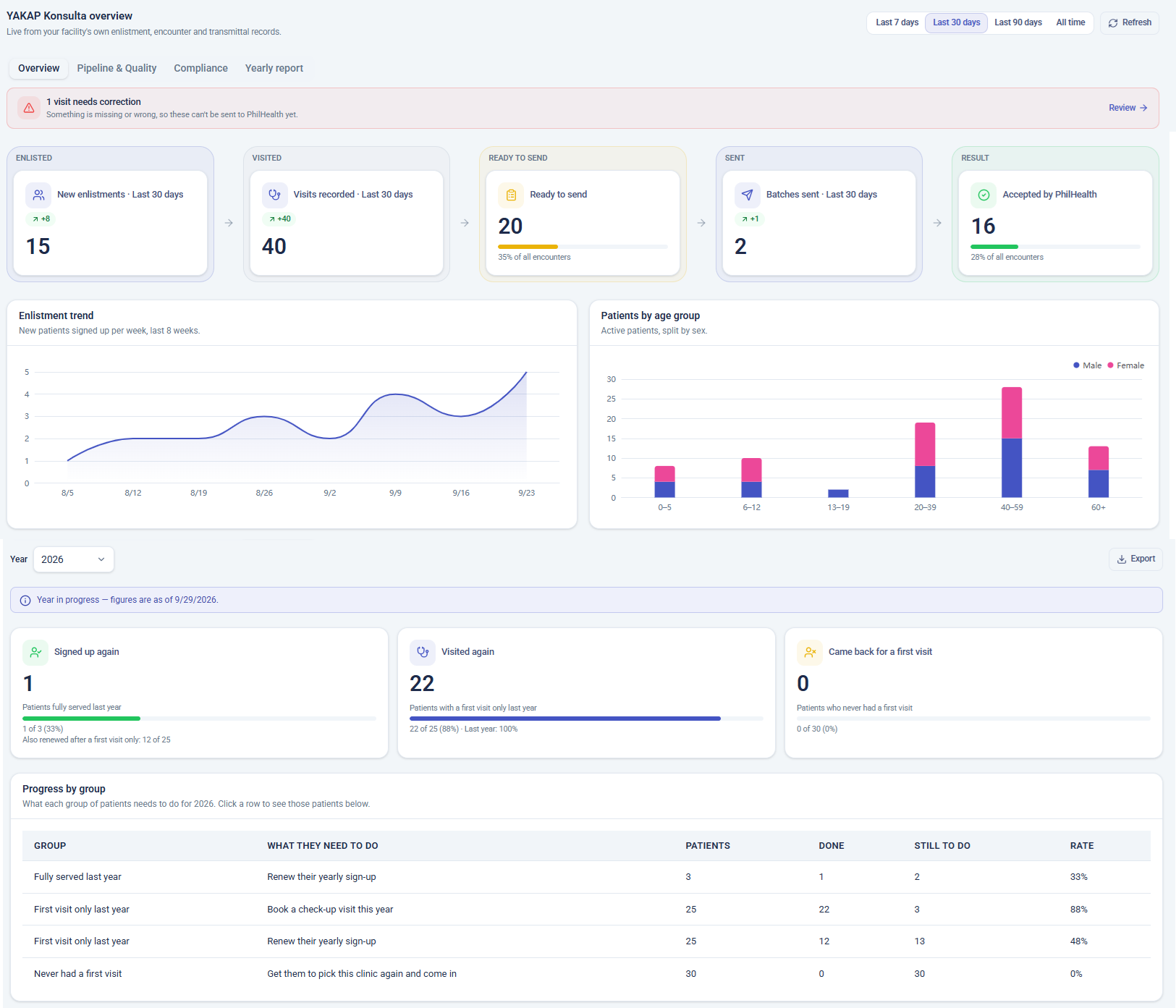
Actual product screenshot · Sample data · Not a live connection.
One workspace. Four points of view.
Notes, vitals and orders stay with the visit.
Review history and draft notes in one place. AI drafts always wait for your review.
History & vitals recorded
Clinical note — draft for review
Lab request linked to visit
Keep care and preparation connected.
Organize the record
The patient list and visit records provide the context behind reporting preparation.
Seen in the Patient and Visit stepsSpot unfinished work
Bring missing references and draft records to staff attention before the next handoff.
Seen in the Review stepFollow the progress
Keep preparation status distinct from external acceptance and payment decisions.
Seen in the Progress stepGood handoffs.
Not more busywork.
Front desk, clinicians and reporting staff see different parts of the same clinic day.
Front desk
Review the patient and record check-in references from PhilHealth’s own process.
Current step in the walkthroughClinician
Keep notes, vital signs and linked orders with the encounter. Clinical drafts require clinician review.
Reporting staff
Review missing information and follow recorded report progress. PhilHealth makes the external decisions.
Start with your clinic. Not a promise.
01 / Discuss your needs
Tell us about your clinic, team and current workflow. No patient data is needed.
02 / Review the fit
See the product and discuss records, migration scope, access and connection requirements.
03 / Agree the setup
Confirm the package, responsibilities and deployment plan before proceeding.
Clear boundaries.
Credible conversations.
SugboDoc is a software platform, not a healthcare provider or an accrediting body.
SugboDoc Technologies Inc. · Cebu City, Philippines
These demonstrations use sample records, not customer outcomes.
Certification and live connection scope must be verified with the team.
PhilHealth controls eligibility, acceptance, deadlines and payment.
The PCU scan runs on PhilHealth’s page. Consent remains with the patient.
Questions worth asking.
Make an informed decision about your clinic’s workflow, responsibilities and readiness.
Explore the clinic guides
What is YAKAP, and what does a clinic actually do?
YAKAP is PhilHealth's primary-care program. Here is what a clinic does through the year, in plain words, and where SugboDoc helps.
First visit vs consultation: what gets reported and when
The first check-up of the year and later consultations are reported separately, with different cutoffs. Here is how to tell them apart.
The yearly sign-up (YES), step by step
The yearly sign-up (YES) is the patient's yearly confirmation on the PhilHealth portal. Here is the order of steps and what the clinic logs.
Spend less time chasing paper. More time with patients.
Book a 30-minute walkthrough with our Cebu team. We’ll show your YAKAP day — sign-up, visit, review and cutoff — using sample records.
Front desk
Check-in and face-scan reference in one place
Doctors
Visit notes with missing items flagged early
Reporting staff
See what’s due before each cutoff
“Show us how a busy morning looks.” — bring that question to your demo.
- 1
We review your request
- 2
We walk your team through it
- 3
We confirm scope and setup
Your request is stored privately for authorized SugboDoc follow-up. Response times are not promised. PhilHealth acceptance and payment remain separate.